
Event Buffering: What It Is and How It Can Be Used in Your Analytics Pipeline
Not every system is ready to listen the moment something worth capturing happens. Event buffering is the practice of temporarily storing events until the consuming system is prepared to receive them — turning a race condition into a guarantee. This article introduces the pattern, explains when and why it's needed, and walks through how it works.
What Is Buffering?
At its core, buffering is one of the oldest ideas in computing: don't send data until the receiver is ready to handle it. Instead of dropping what can't be processed immediately, you hold it in a temporary storage area — a buffer — and release it when the time is right.
The concept is everywhere. When you stream a video, your browser downloads chunks ahead of playback and holds them in a buffer so the video doesn't stutter every time the network hiccups. When you type on a keyboard, keystrokes are buffered so no character is lost, even if the CPU is momentarily busy.
The pattern appears across every layer of a modern system:
| Domain | What's Buffered | Why |
|---|---|---|
| Networking (TCP) | Packets | Handles varying transmission speeds between sender and receiver |
| Operating Systems | I/O operations | Batches disk reads/writes to reduce expensive system calls |
| Video Streaming | Media frames | Absorbs network jitter so playback remains smooth |
| Keyboard Input | Keystrokes | Ensures no input is lost while the CPU handles other tasks |
| Database Writes | Transactions | Groups multiple writes into a single flush for performance |
In every case, the idea is the same: data arrives before something is ready to handle it, and a buffer holds onto it until it is.
Why Buffering Matters
Buffering provides three core benefits:
- Reliability — No data is lost while the receiver is unavailable.
- Decoupling — The sender doesn't need to wait for the receiver to be ready.
- Performance — Items can be processed in batches instead of one at a time.
The tradeoff is memory. If the receiver never catches up, the buffer grows without bound — which is why well-designed buffers have size limits and eviction policies.
The Problem in Analytics
In any web application, third-party scripts load asynchronously. There is always a gap between the moment a user starts interacting with a page and the moment the analytics SDK finishes initializing. Events fired during that gap — page views, clicks, form submissions — are silently lost.
We load RudderStack from its CDN instead of the npm package to keep the SDK out of the main bundle and therefore make it smaller in size, that also means it loads async, so the buffer is necessary.
This is the timeline of a typical page load:
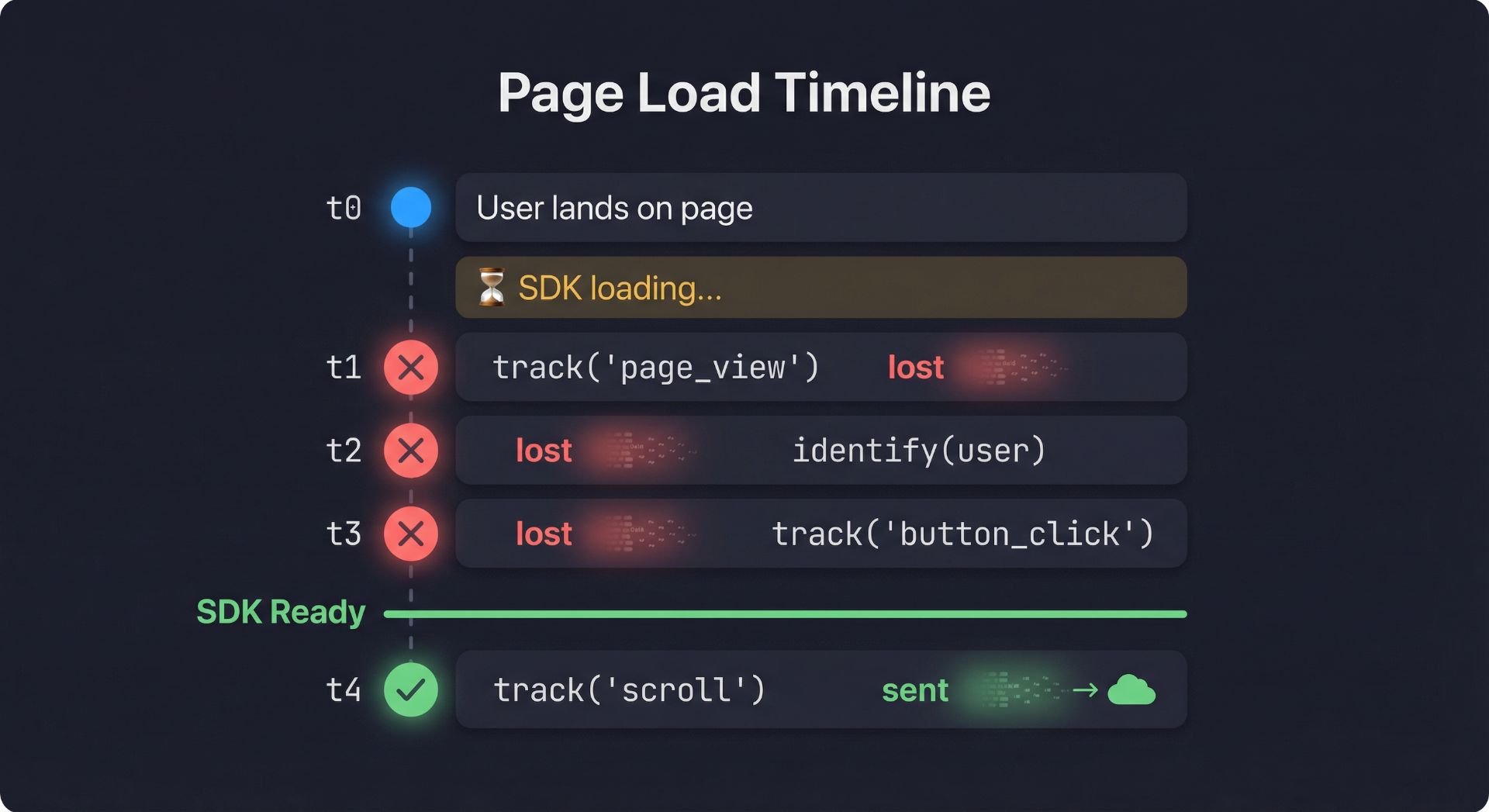
Everything before the SDK is ready is gone. For analytics, this means missing attribution data, and unreliable metrics.
The Solution: An Event Buffer
A buffer sits between your application code and the analytics SDK. It intercepts every event call and makes a simple decision:
- SDK ready? → send the event directly.
- SDK not ready? → hold the event in a queue and send it later.
The core routing logic looks like this:
function sendOrBufferEvent(method, args) {
  if (isSDKReady()) {
    try {
      analytics[method](...args);
    } catch (err) {
      bufferEvent(method, args);
    }
  } else {
    bufferEvent(method, args);
  }
}
Notice the
try/catch— even when the SDK reports itself as ready, a call can still fail. The buffer acts as a safety net in that case too.
Key Design Decisions
1. Fixed-Size Buffer with Eviction
An unbounded queue is dangerous in the browser. If the SDK never loads, the buffer grows indefinitely, consuming memory. A fixed-size buffer with oldest-first eviction solves this:
const BUFFER_CONFIG =
  {
    MAX_BUFFER_SIZE: 10,
    FLUSH_TIMEOUT: 60000,
  };

function bufferEvent(method,args) {
  if (eventBuffer.length >= BUFFER_CONFIG.MAX_BUFFER_SIZE) {
    eventBuffer.shift(); // evict the oldest event
  }
  eventBuffer.push(
    {
      method,
      args,
    },
  );
}
This creates a sliding window — the buffer always holds the most recent events. Older events are sacrificed to keep memory bounded. The assumption is that recent interactions are more valuable than stale ones.
2. Dual Flush Triggers
The buffer is flushed in two scenarios:
| Trigger | When | Purpose |
|---|---|---|
| Ready callback | SDK signals it has initialized | Primary — the happy path |
| Timeout (60s) | Fixed duration after page load | Fallback — in case the callback is unreliable |
let flushTimeout = null;
let readyEventListener = null;

function setupTimeoutFlush() {
  if (flushTimeout || typeof window === "undefined") return;
  flushTimeout = setTimeout(() => {
    if (eventBuffer.length > 0 && isSDKReady()) {
      flushBuffer();
    }
  }, BUFFER_CONFIG.FLUSH_TIMEOUT);
}

function setupReadyListener() {
  if (readyEventListener || typeof window === "undefined") return;

  readyEventListener = () => markAsReady();

  if (window.analytics && window.analytics.ready) {
    window.analytics.ready(readyEventListener);
  }

  setupTimeoutFlush();
}
The timeout is set up once and uses BUFFER_CONFIG.FLUSH_TIMEOUT. It only flushes when the buffer has events and the SDK is ready, so the fallback does not send into a half-initialized system.
3. One-Way Ready State
Once the SDK is marked as ready, it stays ready. The markAsReady function is idempotent — calling it multiple times has no effect:
function markAsReady() {
  if (_isReady) return; // already marked

  readyEventListener = null;
  if (flushTimeout) {
    clearTimeout(flushTimeout);
    flushTimeout = null;
  }
  _isReady = true;
  flushBuffer();
}
This avoids duplicate flushes and clears the ready callback and timeout as soon as the primary trigger fires.
4. Readiness Check
A simple boolean flag is not enough. True readiness means the SDK object exists and exposes the methods we need:
function isSDKReady() {
  return (
    typeof window !== "undefined" &&
    window.analytics &&
    _isReady &&
    typeof window.analytics.track === "function" &&
    typeof window.analytics.identify === "function"
  );
}
This guards against edge cases where the SDK script is loaded but not fully initialized, or where a different script has overwritten the global.
The Flush
When the buffer flushes, every queued event is dispatched and the queue is emptied:
async function flushBuffer() {
  if (eventBuffer.length === 0) return;

  // Snapshot and drain: remove only the current events. Events added during
  // the async window stay in the buffer for the next flush.
  const toFlush = eventBuffer.splice(0, eventBuffer.length);

  const promises = toFlush.map((event) => {
    return new Promise((resolve) => {
      try {
        analytics[event.method](...event.args);
        resolve({ success: true });
      } catch (error) {
        resolve({ success: false, error });
      }
    });
  });

  await Promise.allSettled(promises);
}
Note:
Promise.allSettledinstead ofPromise.all— one failing event does not block the rest.
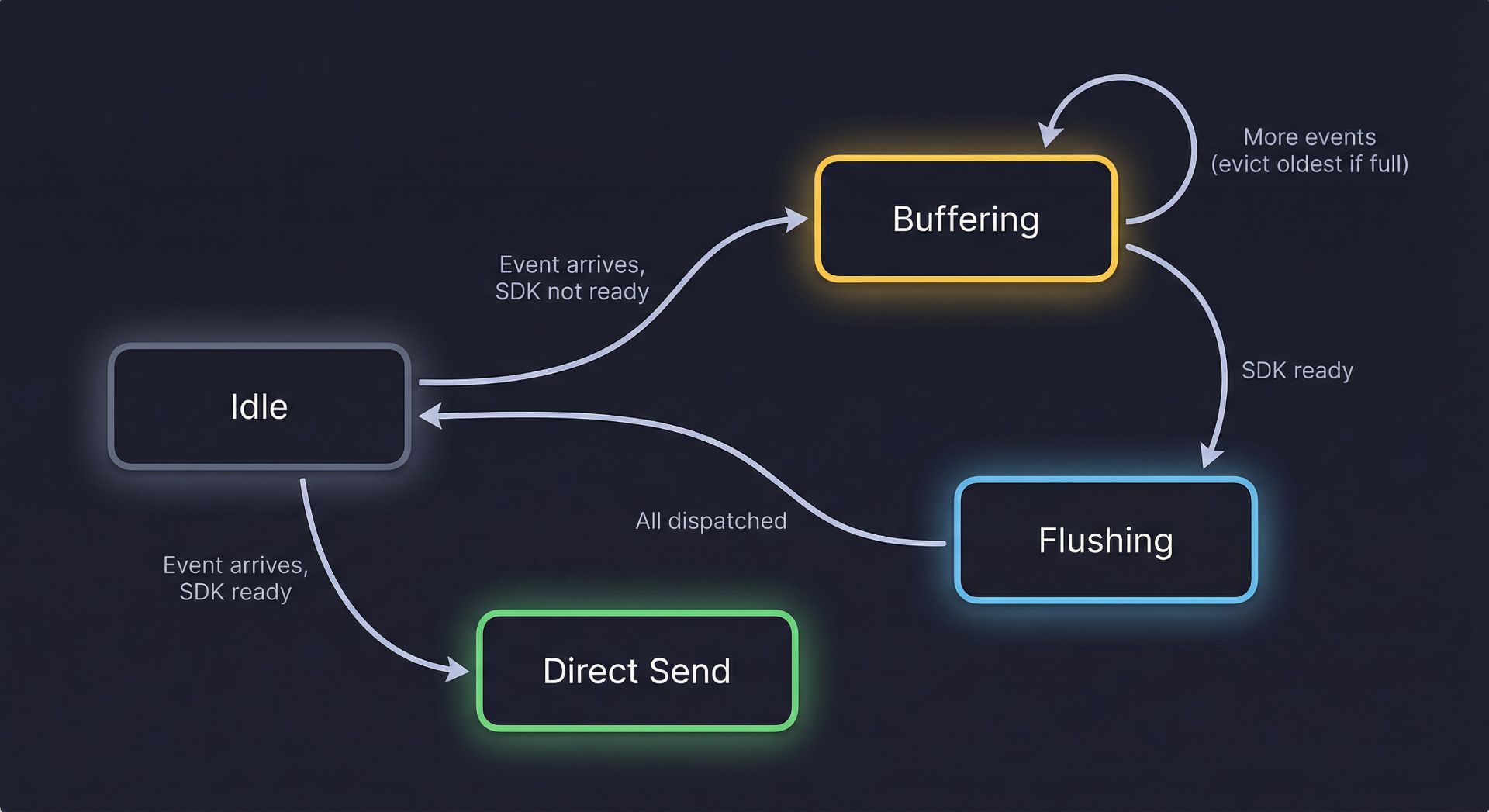
Lifecycle at a Glance
The buffer moves through four states:
| State | Description |
|---|---|
| Idle | No events queued, waiting for activity |
| Buffering | SDK not ready, events are being queued |
| Flushing | SDK became ready, Sending (dispatching) all queued events |
| Direct Send | SDK is ready, events bypass the buffer entirely |
Public API
The setup module exposes only three functions — everything else is internal:
| Function | Purpose |
|---|---|
sendOrBufferEvent(method, args) | Route an event: send immediately or queue |
setupReadyListener() | Register the SDK ready callback and start the timeout |
isSDKReady() | Check whether the SDK is fully initialized |
This minimal surface area makes the buffer easy to integrate and hard to misuse.
When to Use This Pattern
Data buffering is useful whenever:
- A third-party SDK loads asynchronously and you need to capture events before it's ready.
- You want zero event loss during the initialization window without blocking the main thread.
- You need a predictable memory footprint — the fixed-size buffer prevents unbounded growth.
- You want a fallback mechanism in case the SDK's ready signal is delayed or never fires.
This pattern is not specific to analytics — it works anywhere data arrives before something is ready to process it.
Tradeoffs
| Advantage | Limitation |
|---|---|
| Zero event loss during SDK load | Oldest events are dropped if buffer overflows |
| Bounded memory usage | Fixed capacity means some data loss under heavy load |
| Timeout fallback for reliability | Events stay in buffer forever if SDK never loads and timeout check fails |
| Simple, stateless API | No persistence — a page refresh clears the buffer |
| Graceful error handling | Failed events during flush are not retried |
Summary
A small buffer removes the guesswork around SDK timing. Your app fires events freely, and the buffer makes sure nothing is lost. The entire implementation is just a fixed-size array, a ready flag, and a few functions.

Written by
Aya Jafar
Frontend Engineer