
Batch Data Pipeline Design: Full Load vs. Incremental Load
Building effective batch data pipelines is fundamental to modern data engineering. This article focuses on implementing batch data pipeline patterns specifically in a SQL, Python, Mage AI, and ClickHouse ecosystem.
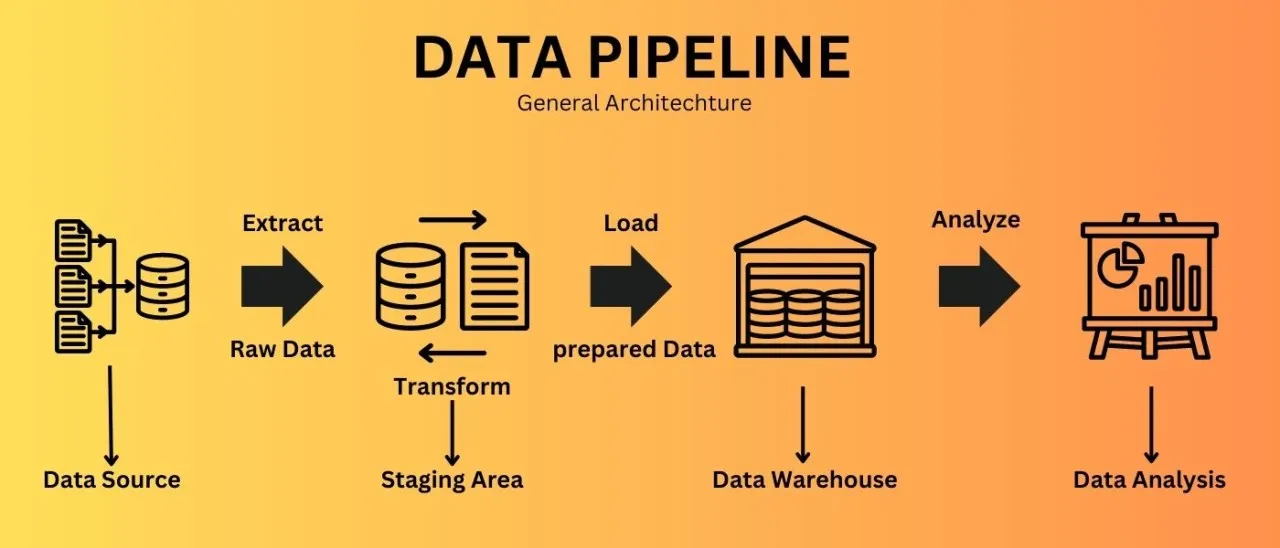
Batch Data Pipeline Design: Full Load vs. Incremental Load
Introduction
Building effective batch data pipelines is fundamental to modern data engineering. This article focuses on implementing batch data pipeline patterns specifically in a SQL, Python, Mage AI, and ClickHouse ecosystem. Rather than covering general patterns with various technologies, we’ll concentrate on practical approaches tailored to this specific technology stack.
Whether you’re integrating data from various SQL databases, REST APIs, or file systems into your ClickHouse data warehouse, this guide provides practical approaches that you can immediately apply to your data pipeline designs using Mage AI for orchestration and Python for transformation logic.
Data Ingestion Patterns
Data ingestion is the process of importing data from various sources into your data processing system. Let’s explore key patterns for batch ingestion in your technology stack.
Full Load Pattern
What is it? The Full Load pattern processes the entire dataset each time your pipeline runs, replacing the previous version completely.
When to use it:
- For small datasets that don’t change frequently
- When source systems don’t provide a way to track changes
- For reference data that needs complete refreshes
- When simplicity is preferred over performance
How it works with your stack:
- Extract the complete dataset from the source using Python or SQL
- Optionally transform the data with Python in Mage AI
- Load it entirely into ClickHouse, replacing the existing data
Example Implementation with Mage AI and ClickHouse:
# Mage AI pipeline block: Full Load from MySQL to ClickHouse
import pandas as pd
from sqlalchemy import create_engine
@data_loader
def extract_from_mysql():
    """Extract the entire product catalog from MySQL"""
    mysql_connection_string = "mysql+pymysql://username:password@host:port/database"
    mysql_engine = create_engine(mysql_connection_string)
    query = "SELECT * FROM products"
    df = pd.read_sql(query, mysql_engine)
    return df
@transformer
def transform_data(df):
    """Apply any necessary transformations"""
    # Convert column names to lowercase for ClickHouse compatibility
    df.columns = [col.lower() for col in df.columns]
    # Add a loaded_at timestamp
    df['loaded_at'] = pd.Timestamp.now()
    return df
@data_exporter
def load_to_clickhouse(df):
    """Load data to ClickHouse, replacing existing data"""
    clickhouse_connection_string = "clickhouse+native://username:password@host:port/database"
    clickhouse_engine = create_engine(clickhouse_connection_string)
    # First, truncate the target table to remove existing data
    with clickhouse_engine.connect() as connection:
        connection.execute("TRUNCATE TABLE IF EXISTS products")
    # Load the new data
    df.to_sql(
        'products',
        clickhouse_engine,
        if_exists='append',
        index=False,
        chunksize=10000  # Adjust based on your dataset size
    )
    return f"Loaded {len(df)} records to ClickHouse products table"
Alternative with staging table:
@data_exporter
def load_to_clickhouse_with_staging(df):
    """Load data to ClickHouse using a staging table for safer replacement"""
    clickhouse_connection_string = "clickhouse+native://username:password@host:port/database"
    clickhouse_engine = create_engine(clickhouse_connection_string)
# Create a timestamp-based staging table name
    import time
    staging_table = f"products_staging_{int(time.time())}"
    # Write to staging table
    df.to_sql(
        staging_table,
        clickhouse_engine,
        if_exists='replace',
        index=False,
        chunksize=10000
    )
    # Atomic swap of staging and production tables
    with clickhouse_engine.connect() as connection:
        # Rename the current production table to old (if it exists)
        connection.execute(f"""
            RENAME TABLE IF EXISTS products TO products_old,
                          {staging_table} TO products
        """)
        # Drop the old table
        connection.execute("DROP TABLE IF EXISTS products_old")
    return f"Loaded {len(df)} records to ClickHouse products table via staging table"
For REST API sources:
@data_loader
def extract_from_rest_api():
    """Extract data from a REST API"""
    import requests
    api_url = "<https://api.example.com/products>"
    response = requests.get(
        api_url,
        headers={"Authorization": "Bearer YOUR_API_TOKEN"}
    )
    if response.status_code == 200:
        data = response.json()
        df = pd.DataFrame(data['products'])
        return df
    else:
        raise Exception(f"API request failed with status code {response.status_code}")
Real-world example:
Your e-commerce platform’s product catalog is maintained in a MySQL database. Every night, your pipeline extracts the entire catalog (20,000 products), applies business rule transformations in Python, and loads it to ClickHouse for analytics. Since the catalog is relatively small and needs consistency, a full load approach works well. The Mage AI pipeline orchestrates this process on a schedule, handling retries automatically.
Challenges and considerations:
- As data volumes grow, full loads become more resource-intensive
- During the load process, tables may be unavailable or incomplete
- Consider using staging tables for atomic swaps to maintain availability
Pro tip: Even with full loads, implement some form of validation to confirm the extracted data meets minimum expectations before replacing your target table. For example, verify that the row count isn’t significantly lower than previous loads, which might indicate an extraction problem.
Incremental Load Pattern
What is it? The Incremental Load pattern processes only new or changed data since the last pipeline run.
When to use it:
- For large or continuously growing datasets
- When source systems provide reliable change tracking
- To optimize processing time and resource usage
How it works with your stack:
Two main implementation approaches:
- Delta column approach: Uses a timestamp or sequence number to identify new/changed records
- Partition-based approach: Processes new time-based partitions
Example Implementation with Mage AI, Python and ClickHouse:
# Mage AI pipeline block: Incremental Load with delta column
import pandas as pd
from sqlalchemy import create_engine
import os

@data_loader
def extract_incremental_data():
    """Extract only new or modified data since last run"""
    # Get last processed timestamp from metadata store
    last_processed_ts = get_last_processed_timestamp()
    # Connect to source database
    source_conn_string = "mysql+pymysql://username:password@host:port/database"
    source_engine = create_engine(source_conn_string)
    # Extract only new/modified data
    query = f"""
    SELECT * FROM orders
    WHERE modified_timestamp > '{last_processed_ts}'
    ORDER BY modified_timestamp
    """
    df = pd.read_sql(query, source_engine)
    # Store current max timestamp for next run
    if not df.empty:
        current_max_ts = df['modified_timestamp'].max()
        store_last_processed_timestamp(current_max_ts)
    return df
def get_last_processed_timestamp():
    """Retrieve the last processed timestamp from metadata store"""
    # In a simple implementation, this could be a file or database table
    metadata_file = "last_processed_timestamp.txt"
    if os.path.exists(metadata_file):
        with open(metadata_file, 'r') as f:
            return f.read().strip()
    else:
        # For first run, return a default timestamp
        return '1970-01-01 00:00:00'
def store_last_processed_timestamp(timestamp):
    """Store the last processed timestamp"""
    with open("last_processed_timestamp.txt", 'w') as f:
        f.write(str(timestamp))
@transformer
def transform_data(df):
    """Apply transformations to the incremental data"""
    if df.empty:
        return df
    # Your transformation logic here
    # ...
    return df
@data_exporter
def load_to_clickhouse(df):
    """Load incremental data to ClickHouse"""
    if df.empty:
        return "No new data to load"
    clickhouse_conn_string = "clickhouse+native://username:password@host:port/database"
    clickhouse_engine = create_engine(clickhouse_conn_string)
    # Append the new data to the existing table
    df.to_sql(
        'orders',
        clickhouse_engine,
        if_exists='append',
        index=False,
        chunksize=10000
    )
    return f"Loaded {len(df)} new/modified records to ClickHouse"
Example Implementation for ClickHouse-specific features:
@data_exporter
def load_incremental_to_clickhouse_merge_tree(df):
    """Load incremental data to ClickHouse MergeTree table"""
    if df.empty:
        return "No new data to load"
    from clickhouse_driver import Client
    # Connect to ClickHouse
    client = Client(
        host='your_clickhouse_host',
        port=9000,
        user='username',
        password='password',
        database='your_database'
    )
    # Prepare data as list of tuples
    data = [tuple(x) for x in df.to_records(index=False)]
    # Insert data to ClickHouse
    client.execute(
        """
        INSERT INTO orders (
            order_id, customer_id, order_date, status,
            total_amount, modified_timestamp
        ) VALUES
        """,
        data
    )
    return f"Loaded {len(df)} new/modified records to ClickHouse MergeTree table"
Handling updates in ClickHouse:
@data_exporter
def handle_updates_in_clickhouse(df):
    """Handle updates in ClickHouse (which doesn't support direct UPDATE)"""
    if df.empty:
        return "No new data to load"
    from clickhouse_driver import Client
    client = Client(
        host='your_clickhouse_host',
        port=9000,
        user='username',
        password='password',
        database='your_database'
    )
    # For each record, delete existing if present then insert new version
    # Warning: This is not atomic and can be inefficient for large updates
    for _, row in df.iterrows():
        # Delete existing record with same key
        client.execute(
            "ALTER TABLE orders DELETE WHERE order_id = %s",
            (row['order_id'],)
        )
        # Insert new version
        client.execute(
            """
            INSERT INTO orders (
                order_id, customer_id, order_date, status,
                total_amount, modified_timestamp
            ) VALUES
            """,
            [(
                row['order_id'], row['customer_id'], row['order_date'], row['status'],
                row['total_amount'], row['modified_timestamp']
            )]
        )
    return f"Updated {len(df)} records in ClickHouse"
Using ReplacingMergeTree for updates:
# SQL to create a ReplacingMergeTree table in ClickHouse that supports efficient updates
"""
CREATE TABLE orders (
    order_id UInt32,
    customer_id UInt32,
    order_date Date,
    status String,
    total_amount Decimal(10,2),
    modified_timestamp DateTime,
    version UInt32
) ENGINE = ReplacingMergeTree(version)
ORDER BY (order_id);
"""

@data_exporter
def load_to_replacing_merge_tree(df):
    """Load data to a ReplacingMergeTree table which handles updates efficiently"""
    if df.empty:
        return "No new data to load"
    # Add a version column incremented for each record
    df['version'] = df.groupby('order_id')['modified_timestamp'].rank().astype(int)
    from clickhouse_driver import Client
    client = Client(
        host='your_clickhouse_host',
        port=9000,
        user='username',
        password='password',
        database='your_database'
    )
    # Prepare data as list of tuples
    data = [tuple(x) for x in df.to_records(index=False)]
    # Insert data to ClickHouse
    client.execute(
        """
        INSERT INTO orders (
            order_id, customer_id, order_date, status,
            total_amount, modified_timestamp, version
        ) VALUES
        """,
        data
    )
    # Force merge to deduplicate records
    client.execute("OPTIMIZE TABLE orders FINAL")
    return f"Loaded {len(df)} records to ClickHouse ReplacingMergeTree table"
For file-based incremental loads:
@data_loader
def extract_incremental_from_files():
    """Extract data from new files since last run"""
    import glob
    from datetime import datetime
    # Get last processed date from metadata store
    last_processed_date = get_last_processed_date()
    # Get list of files created since last run
    file_pattern = "/data/incoming/orders_*.csv"
    all_files = glob.glob(file_pattern)
    # Filter for new files only
    new_files = []
    for filepath in all_files:
        # Extract date from filename (assuming pattern like orders_YYYYMMDD.csv)
        filename = os.path.basename(filepath)
        file_date_str = filename.split('_')[1].split('.')[0]
        file_date = datetime.strptime(file_date_str, "%Y%m%d").date()
        if file_date > last_processed_date:
            new_files.append(filepath)
    # Read and combine new files
    if new_files:
        dfs = []
        for filepath in new_files:
            df = pd.read_csv(filepath)
            dfs.append(df)
        combined_df = pd.concat(dfs, ignore_index=True)
        # Update last processed date
        current_max_date = datetime.now().date()
        store_last_processed_date(current_max_date)
        return combined_df
    else:
        return pd.DataFrame()  # Empty dataframe if no new files
Real-world example:
Your online retail system records thousands of orders daily in a PostgreSQL database. Using the Incremental Load pattern with Mage AI and ClickHouse:
- Your pipeline identifies new and updated orders using the
last_modifiedtimestamp column - For each run, it stores the maximum timestamp processed as a checkpoint
- It loads only the changed records to ClickHouse’s ReplacingMergeTree table
- ClickHouse handles deduplication automatically based on the order_id and version
This approach significantly reduces processing time and resource usage compared to full loads, while still maintaining an up-to-date view of orders in the analytics database.
Challenges and considerations:
- Hard Deletes: Difficult to detect records physically deleted in the source system
- Change Detection: Requires reliable change tracking in source systems
- ClickHouse Update Limitations: ClickHouse doesn’t support traditional UPDATE statements, requiring alternative approaches like ReplacingMergeTree
- Checkpoint Management: Need reliable storage and management of processing checkpoints
Pro tip: When working with ClickHouse, choose the appropriate table engine based on your update patterns. Use ReplacingMergeTree for tables that require updates, and MergeTree for append-only data to optimize performance.
Key Takeaways
Choose the right ingestion pattern based on your data volume, change frequency, and system capabilities:
- Full Load for simplicity and small datasets
- Incremental Load for large, growing datasets
- Data Compaction to maintain performance over time
- Readiness Markers or External Triggers for event-driven processing

Written by
Hameed Mahmood Salih
Data Engineer